Web search
Web search gives every engineer’s coding tool a web_search tool, whatever
model their route runs on. Panorama serves it at /mcp and searches Amazon’s
own web index through an Amazon Bedrock AgentCore gateway in your account,
so a query stays inside AWS.
Coding tools’ built-in search does not work through Panorama: Claude Code’s is a tool on Anthropic’s own API, which Bedrock refuses. This replaces it.
Before you start
Section titled “Before you start”- A region for the gateway. The AgentCore Web Search Tool is available in
us-east-1,eu-west-1andap-northeast-1. It does not have to match your model providers’ regions. - The role policy. The deployment’s role needs
bedrock-agentcore:InvokeGateway. The CloudFormation template grants it. On any other deployment, attach the policy shown under Role policy on Settings → Web search. - Cost. AWS charges $7 per 1,000 searches. Panorama records each one at that rate unless you set another.
Create the gateway
Section titled “Create the gateway”With the CloudFormation stack
Section titled “With the CloudFormation stack”Update the stack with CreateWebSearchGateway set to true. It creates the
gateway, its service role and a web search target, and gives the gateway’s URL
to Panorama. Search is on as soon as the new tasks start, with nothing to
paste:
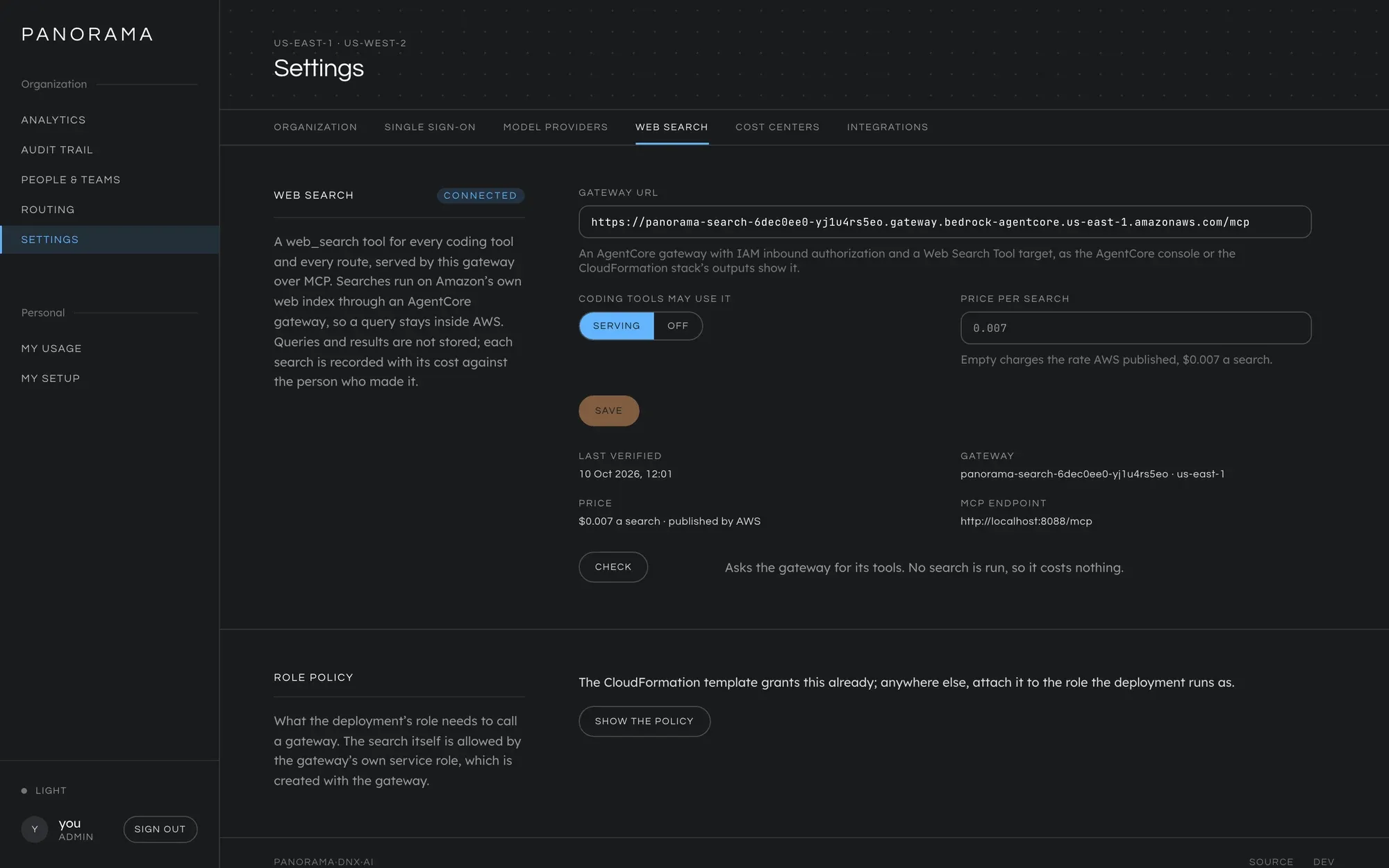
- Settings → Web search shows the gateway and its URL, marked
set by the deployment, and the price AWS publishes. Neither can be changed there. - Coding tools may use it is the one control. Set it to Off and press Save to stop offering search; set it back to Serving to start again.
- Press Check once to confirm the gateway answers. The state changes from
never checkedtoconnected.
The rest of this page, from Anywhere else to Turn it on, is for a gateway you create yourself.
Anywhere else
Section titled “Anywhere else”Create an AgentCore gateway with IAM inbound authorization and add a Web Search Tool target to it. In the AWS CLI, with a service role the gateway can assume (below):
aws bedrock-agentcore-control create-gateway \  --name panorama-web-search --protocol-type MCP \  --authorizer-type AWS_IAM --role-arn <service-role-arn> \  --region us-east-1
aws bedrock-agentcore-control create-gateway-target \  --gateway-identifier <gateway-id> --name web-search \  --target-configuration '{"mcp":{"connector":{"source":{"connectorId":"web-search"},"configurations":[{"name":"WebSearch","parameterValues":{}}]}}}' \  --credential-provider-configurations '[{"credentialProviderType":"GATEWAY_IAM_ROLE"}]' \  --region us-east-1
The service role trusts bedrock-agentcore.amazonaws.com and allows
bedrock-agentcore:InvokeGateway on the gateway and
bedrock-agentcore:InvokeWebSearch on
arn:aws:bedrock-agentcore:<region>:aws:tool/web-search.v1. The gateway’s URL,
ending in /mcp, is in the output of create-gateway and in the AgentCore
console.
Use one web search target per gateway. Panorama refuses a gateway with two, because each can carry its own domain filters and there would be no telling which applied.
Turn it on
Section titled “Turn it on”For a gateway you created yourself, in Settings → Web search:
- Paste the gateway’s URL into Gateway URL.
- Leave Price per search empty to charge the rate AWS publishes, or enter another in dollars.
- Press Turn on.
- Press Check. Panorama asks the gateway for its tools, which runs no
search and costs nothing. The state changes from
never checkedtoconnected.
Check it worked
Section titled “Check it worked”- My setup now includes web search for each tool: an Add web search step for Claude Code, and an MCP server entry in the opencode and Codex files. Engineers who set up their tool before you turned search on need to follow that step, or copy their file again.
- A search appears in the Audit trail with the model
web-search, the price per search as its cost, and the engineer who made it. Spend views count it in the totals and showweb-searchbeside the models.
What is recorded
Section titled “What is recorded”A search is recorded like a request: who made it, from which tool, when, the outcome and the cost. The query and the results are not stored anywhere.
In the Audit trail a search is part of the sitting it was made from, shown
as a tool call among the model calls when the row is opened, and counted
under the route on the row. A search carries no conversation id, so Panorama
places it in the conversation the same engineer’s same tool was last in, which
also attributes it to that conversation’s work.
A search counts against the engineer’s budgets. A hard limit stops searches as it stops everything else. A soft limit does not stop them, and the result carries the same warning a request would.
Turn it off
Section titled “Turn it off”Set Coding tools may use it to Off and press Save. The tool disappears from every coding tool’s list at its next connection, and a search already in a tool’s list is answered with “Web search is switched off on this Panorama deployment.”
Restrict which sites are searched
Section titled “Restrict which sites are searched”Domain filters are set on the gateway’s target, not in Panorama: an include or
exclude list in the target’s parameterValues.domainFilter, which a coding
tool cannot override. See the AgentCore documentation for the Web Search Tool.
What goes wrong
Section titled “What goes wrong”| On the screen | Cause |
|---|---|
failing, with is not an AgentCore gateway host |
The URL is not a gateway’s. It looks like https://<gateway-id>.gateway.bedrock-agentcore.<region>.amazonaws.com/mcp. |
| The check fails with bedrock-agentcore:InvokeGateway | The deployment’s role lacks the policy, or the gateway uses JWT authorization instead of IAM. |
| The check fails with has no web search target | The gateway has no Web Search Tool target, or it was deleted. |
| The check fails with web search targets | The gateway has more than one. Keep one. |
| Searches fail with Web search is unavailable | The engineer is told to carry on without it. The cause is in Panorama’s log, under the request id their tool shows. |
The reasoning behind serving search this way, rather than inside the model request, is in Design decisions.
This manual is licensed underCC BY 4.0. Code samples in it are part of Panorama, licensed under theGNU AGPL v3.0 only.