Deploying on AWS
deploy/cloudformation/panorama.yaml is one template and the whole deployment.
There is no bootstrap stack and nothing to install on the machine that deploys
it, and your security team can read all of it before it runs.
This is the recommended way to deploy Panorama. The Quickstart follows it from an empty account to a coding tool’s first request; this page has the detail behind each step.
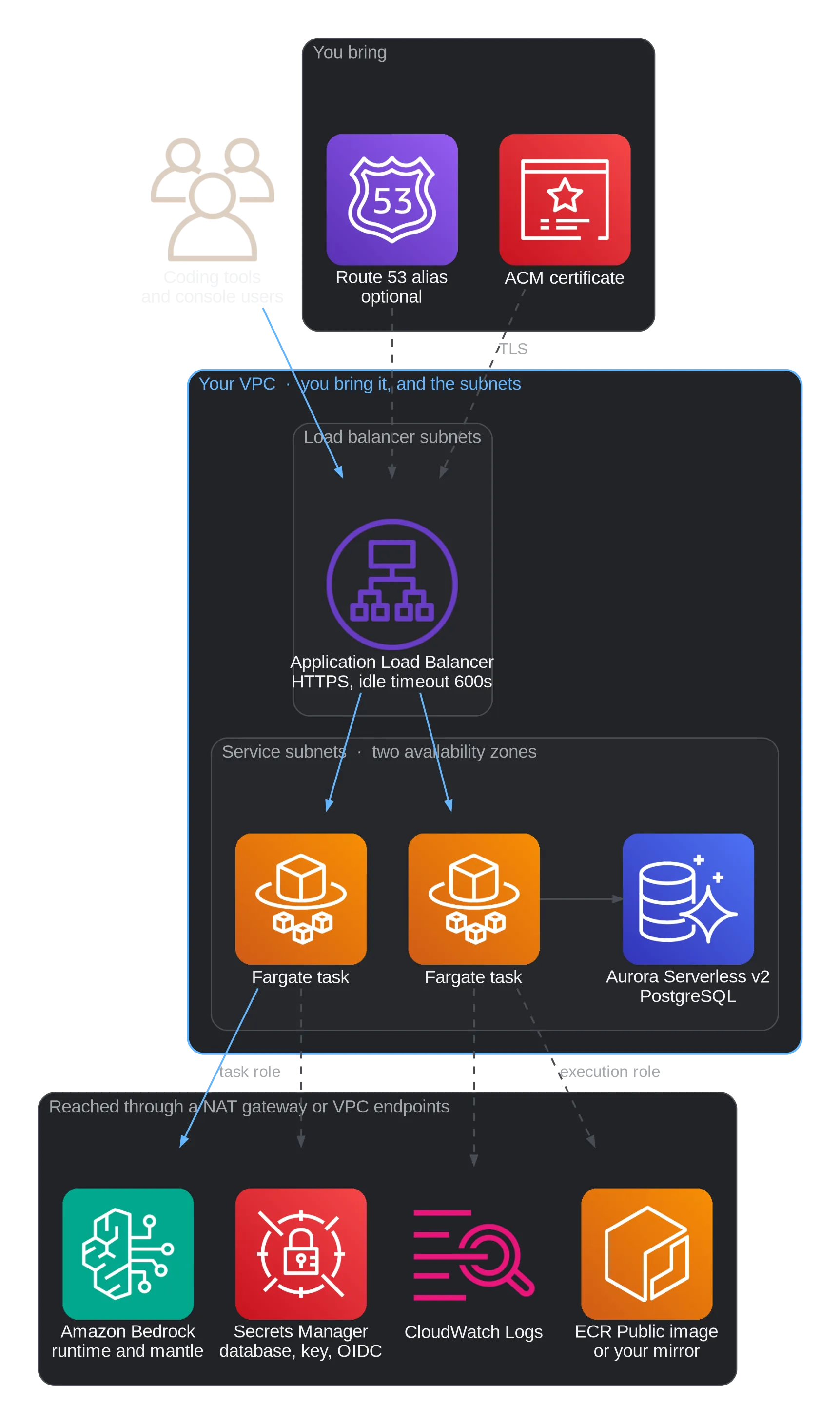
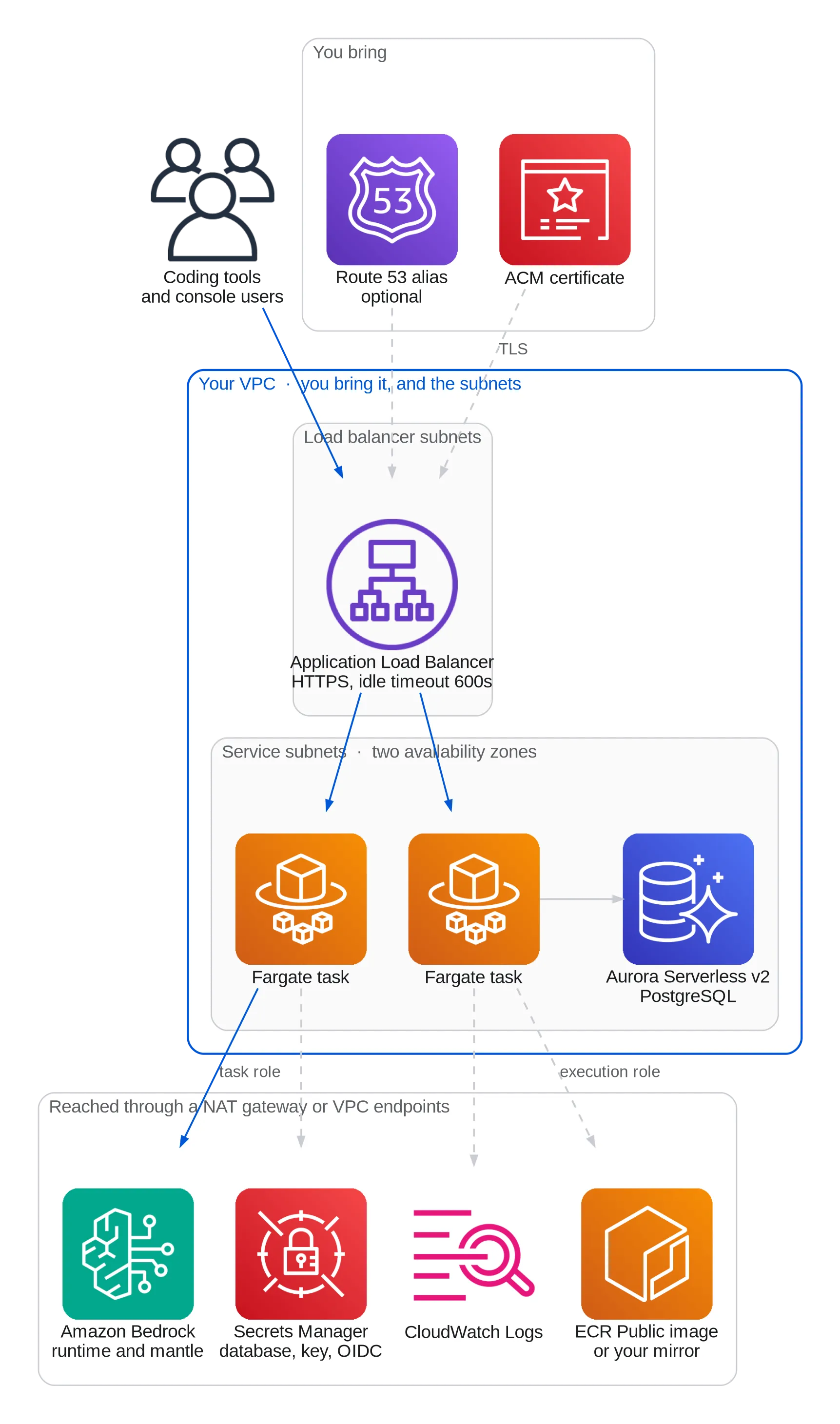
What it creates, and what you bring
Section titled “What it creates, and what you bring”| The template creates | You bring |
|---|---|
| An ECS cluster and a Fargate service on ARM64, two tasks by default | A VPC with subnets in at least two availability zones |
| An Application Load Balancer with HTTPS, and an HTTP to HTTPS redirect | An ACM certificate in the same region, for your hostname |
| An Aurora Serverless v2 PostgreSQL cluster | A NAT gateway or VPC endpoints, if the tasks are in private subnets |
| Secrets for the database password, the encryption key and the OIDC connection | |
| A task role carrying the Bedrock policy, and an execution role | |
| Three security groups, and optionally a Route 53 alias record | |
| Optionally, an AgentCore gateway for web search |
Before you start
Section titled “Before you start”- A VPC with subnets in two availability zones. Private subnets behind a
NAT gateway are the intended shape. Public subnets work with
AssignPublicIp=ENABLED. The load balancer’s subnets may differ from the service’s. - An ACM certificate for the hostname, in the region you deploy to.
- Decide about VPC endpoints if your private subnets have no NAT gateway. See Connectivity.
- Decide who may reach it.
IngressCidrtakes up to four CIDRs separated by commas, such as203.0.113.0/24,198.51.100.7/32, and defaults to everybody. For more ranges, put them in a managed prefix list and pass its id asIngressPrefixListId; leaveIngressCidrempty to admit only the list.
The image is public, at public.ecr.aws/dnxsolutions/panorama, so there is nothing
to request first.
You do not need to request Bedrock model access, but an account that has never used Claude submits Anthropic’s use case form once first. See Model access.
Deploy
Section titled “Deploy”The first deploy is three commands, because database migrations run before the service starts.
Every command on this page names its region with --region "$REGION". Set it
once in each terminal you use. Without it the AWS CLI uses AWS_REGION or your
profile’s region, which in AWS CloudShell is the console’s, and a command run
against the wrong region fails as though the stack did not exist:
REGION=us-east-1 # the region the stack is in1. Create the stack with no tasks
Section titled “1. Create the stack with no tasks”Every release has its template attached, and that template runs that
release’s version. Take the latest one, or a particular release’s from
releases/download/<version>/panorama.yaml:
curl -fsSLO https://github.com/dnxlabs/panorama/releases/latest/download/panorama.yaml
aws cloudformation deploy --region "$REGION" \  --stack-name panorama \  --template-file panorama.yaml \  --capabilities CAPABILITY_IAM \  --parameter-overrides \      VpcId=vpc-0123456789abcdef0 \      ServiceSubnetIds=subnet-aaa,subnet-bbb \      LoadBalancerSubnetIds=subnet-ccc,subnet-ddd \      DomainName=panorama.example.com \      CertificateArn=arn:aws:acm:us-east-1:111122223333:certificate/... \      BedrockRegion=us-east-1 \      DesiredCount=0
DesiredCount=0 is the point of this step: the database, the load balancer and
the task definition are created, and nothing starts against an empty schema. It
takes about fifteen minutes, nearly all of it Aurora.
The Quickstart has a Launch stack
button that does the same from the AWS console, with DesiredCount already
set to 0.
2. Run the migrations
Section titled “2. Run the migrations”The stack outputs the exact command, filled in with your cluster, subnets and security group:
aws cloudformation describe-stacks --region "$REGION" --stack-name panorama \ --query "Stacks[0].Outputs[?OutputKey=='MigrateCommand'].OutputValue" --output textRun what it prints, wait for the task to stop, and confirm it exited zero:
aws ecs describe-tasks --region "$REGION" --cluster panorama --tasks <task-arn> \ --query "tasks[0].containers[0].exitCode"A non-zero exit is explained in CloudWatch Logs under /aws/ecs/panorama.
3. Start the service
Section titled “3. Start the service”aws cloudformation deploy --region "$REGION" --stack-name panorama --template-file panorama.yaml \ --capabilities CAPABILITY_IAM --parameter-overrides DesiredCount=2Two is the smallest count that survives the loss of an availability zone.
aws cloudformation deploy keeps the current value of every parameter you
leave out, so leaving DesiredCount out would keep it at 0.
4. Point DNS at it
Section titled “4. Point DNS at it”If you passed HostedZoneId, the alias record already exists. Otherwise create
a CNAME or alias to the LoadBalancerDnsName output.
5. Get a setup code and sign in
Section titled “5. Get a setup code and sign in”A new deployment has no accounts, so you sign in the first time with a one-time setup code. Mint one with a one-off task. With two tasks running, reading the code out of the service’s startup logs is unreliable: both mint one and only the later one works.
The RunTaskNetwork stack output is the service’s network, subnets, security
group and public IP setting included, so a one-off task reaches what the
service reaches:
NETWORK=$(aws cloudformation describe-stacks --region "$REGION" --stack-name panorama \  --query "Stacks[0].Outputs[?OutputKey=='RunTaskNetwork'].OutputValue" --output text)
aws ecs run-task --region "$REGION" --cluster panorama --task-definition panorama \  --launch-type FARGATE --network-configuration "$NETWORK" \  --overrides '{"containerOverrides":[{"name":"panorama","command":["admin","setup"]}]}'
The code is in that task’s log stream. Open the ConsoleUrl output and enter
it, then connect single sign-on as described next.
The cluster, log group and task family are all named after the stack, so these
commands assume you called it panorama.
Evaluating without an identity provider
Section titled “Evaluating without an identity provider”If you have no identity provider to connect yet, skip the setup code and mint
an administrator’s gateway token instead, with the same one-off task and the
same NETWORK:
aws ecs run-task --region "$REGION" --cluster panorama --task-definition panorama \ --launch-type FARGATE --network-configuration "$NETWORK" \ --overrides '{"containerOverrides":[{"name":"panorama","command":["token","create","-email","you@example.com","-role","admin"]}]}'The token is in that task’s log stream. Open the ConsoleUrl output, paste it
under Gateway token and press Sign in. The console is then yours, as an
administrator, until you connect single sign-on, at which point the token field
disappears and you sign in through your provider. Accounts for anybody else
need a token each, minted the same way. The task’s log holds the token, so
delete that log stream once you have copied it.
Connect single sign-on
Section titled “Connect single sign-on”The stack creates an empty secret for the OIDC connection, and the task definition already reads every field from it. Do not edit the task definition. It belongs to CloudFormation, and a hand edit is reverted by the next stack update without a word.
In the setup session, choose your provider, enter the issuer and client id, and press Check this connection. The screen prints the secret value with your details filled in. Then:
SECRET=$(aws cloudformation describe-stacks --region "$REGION" --stack-name panorama \  --query "Stacks[0].Outputs[?OutputKey=='OidcSecretArn'].OutputValue" --output text)
aws secretsmanager put-secret-value --region "$REGION" --secret-id "$SECRET" --secret-string '{  "issuer":        "https://login.microsoftonline.com/<tenant>/v2.0",  "client_id":     "...",  "client_secret": "...",  "scopes":        "",  "groups_claim":  ""}'
aws ecs update-service --region "$REGION" --cluster panorama --service panorama --force-new-deployment
The last command is not optional. A task reads the secret once, when it starts.
Google Workspace only: also set the OidcAllowedDomains stack parameter to
your Workspace’s primary domain, with aws cloudformation deploy and
--parameter-overrides OidcAllowedDomains=example.com. Panorama refuses to
start on Google’s issuer without it. It is a parameter and not a key of the
secret, because a domain is not a secret. See
Limit sign-in to your domains.
Leave scopes and groups_claim empty unless your provider differs from the
defaults. Do not put a placeholder in issuer. REPLACE_ME fails
validation and the task will not start, and a plausible fake URL is worse: it
passes validation and the console offers a sign-in button that goes nowhere.
Press End session and sign in. The first person through becomes an
administrator. The OidcRedirectUri stack output is the redirect URI to
register at your provider.
Single sign-on is the step most likely to go wrong, usually silently. See Single sign-on for how it works and how to map groups to roles, Identity provider guides for your provider, and SSO troubleshooting by symptom.
Then carry on in the console, where an administrator sees a setup checklist: Model providers, Routes, Budgets, and sending engineers to My setup.
Turn on web search
Section titled “Turn on web search”To give engineers’ coding tools a web_search tool, update the stack with
--parameter-overrides CreateWebSearchGateway=true. It creates an AgentCore
gateway with a Web Search Tool target, which is available in us-east-1,
eu-west-1 and ap-northeast-1; in any other region the stack refuses the
parameter before creating anything. Search is on as soon as the new tasks
start, and Settings → Web search shows the gateway with a switch to turn
it off. A stack in another region can still use search: create the gateway in
one of those three regions and paste its URL there instead. See
Web search.
Choose which image to run
Section titled “Choose which image to run”ImageTag takes any of these:
| Value | What it is |
|---|---|
| empty | The release the template came from. The default. |
stable |
The latest release. |
beta |
The latest prerelease. |
v0.1.3 |
One version. A release never overwrites one. |
sha256:d7ae… |
The exact bytes. The strongest form. |
Leave it empty unless you have a reason not to. The template attached to a
release runs that release, so the image changes when you deploy a newer
release’s template, and only then; see Upgrading.
Empty in the repository’s own copy of the template means stable.
Do not follow a channel in production. stable and beta move. Deploying the same template twice can then produce two different
versions, and ECS does not re-pull a tag it already has, so a moving tag gives
you either a deploy that silently does nothing or a fleet running two versions.
To resolve a tag to its digest:
docker buildx imagetools inspect public.ecr.aws/dnxsolutions/panorama:stable \ --format '{{.Manifest.Digest}}'Each release’s image.json lists the same digest. To check that an image was
built from the public source, verify its provenance:
gh attestation verify oci://public.ecr.aws/dnxsolutions/panorama:v0.1.3 -R dnxlabs/panoramaTo pull from your own account instead, mirror the image into your own ECR,
or create a pull-through cache for public.ecr.aws, and set ImageRepository
to it, for example
123456789012.dkr.ecr.eu-west-1.amazonaws.com/panorama. Copy with
docker buildx imagetools create, which keeps both architectures; docker pull then docker push flattens it to your machine’s. Private subnets with no
NAT gateway need this, because ECR Public has no VPC endpoint. The
CloudFormation README
has the commands for both.
Tasks run on ARM64. If you point at an amd64-only image, set
TaskCpuArchitecture=X86_64, or tasks fail with an exec format error that
reads like a corrupt image.
Connectivity
Section titled “Connectivity”With a NAT gateway, or in public subnets with AssignPublicIp=ENABLED, you need
nothing further. Without either, create these VPC endpoints before deploying:
| Endpoint | What breaks without it |
|---|---|
bedrock-runtime |
Every request to the bedrock provider |
bedrock |
Model discovery: the catalogue stays empty, so no route can be created |
bedrock-mantle |
Only if you enable that provider: its requests and discovery |
ecr.api, ecr.dkr, and the s3 gateway endpoint |
The image pull from your mirror: tasks never start |
secretsmanager |
Secret injection: tasks never start |
logs |
All logging, including the setup code |
ECR Public has no VPC endpoint. Without a NAT gateway or public IPs the
tasks cannot reach public.ecr.aws, so pull from a mirror or a pull-through
cache in your own account instead. See
Choose which image to run.
The AWS Pricing API has no VPC endpoint. A fully private deployment either keeps a NAT route for that one call or prices requests at the rates compiled into the binary, which go stale. Decide before you deploy.
Running a command
Section titled “Running a command”Anything you would run with docker compose exec on a server is a one-off ECS
task here, built from the current task definition, so it uses the same image,
database and secrets as the service:
NETWORK=$(aws cloudformation describe-stacks --region "$REGION" --stack-name panorama \  --query "Stacks[0].Outputs[?OutputKey=='RunTaskNetwork'].OutputValue" --output text)
aws ecs run-task --region "$REGION" --cluster panorama --task-definition panorama \  --launch-type FARGATE --network-configuration "$NETWORK" \  --overrides '{"containerOverrides":[{"name":"panorama","command":["sso","doctor"]}]}'
Swap the command for what you need, such as ["admin","setup"],
["migrate","status"] or
["token","create","-email","you@example.com","-role","admin"]. The output is
in that task’s log stream.
For a shell in a running task, ECS Exec is enabled:
aws ecs execute-command --region "$REGION" --cluster panorama --task <task-id> \ --container panorama --interactive --command /busybox/shThat shell runs as root beside the Bedrock credentials and the database
connection, so control who holds ecs:ExecuteCommand on this cluster.
What it costs
Section titled “What it costs”The stack runs around the clock, and the database is most of the bill. With the default parameters, before any Bedrock usage:
Sydney (ap-southeast-2) |
N. Virginia (us-east-1) |
|
|---|---|---|
| Aurora Serverless v2, 0.5 capacity units at all times | $73 | $44 |
| Application Load Balancer, hourly charge and light traffic | $21 | $19 |
| Two Fargate tasks, ARM64, 0.5 vCPU and 1 GB each | $35 | $29 |
| Two public IPv4 addresses on the load balancer | $7 | $7 |
| Three Secrets Manager secrets | $1 | $1 |
| About, per month | $137 | $100 |
Prices are AWS’s on-demand list prices in US dollars, for 730 hours. Container Insights metrics, CloudWatch Logs and database storage add a few dollars more with light use. A NAT gateway is not part of the stack; if your private subnets need one for Panorama alone, it adds about $43 a month in Sydney and $33 in N. Virginia.
The database cannot go lower. Its minimum of 0.5 capacity units is the smallest that stays running, and a capacity of 0, which lets Aurora pause, is never reached, because the gateway checks its configuration every second.
A cheaper deployment for an evaluation
Section titled “A cheaper deployment for an evaluation”For a trial that nobody depends on, these parameters run one task instead of two, about $17 a month less in Sydney, need no NAT gateway, and remove the migration step:
aws cloudformation deploy --region "$REGION" \ --stack-name panorama \ --template-file panorama.yaml \ --capabilities CAPABILITY_IAM \ --parameter-overrides \ VpcId=vpc-0123456789abcdef0 \ ServiceSubnetIds=subnet-ccc,subnet-ddd \ LoadBalancerSubnetIds=subnet-ccc,subnet-ddd \ AssignPublicIp=ENABLED \ DomainName=panorama.example.com \ CertificateArn=arn:aws:acm:us-east-1:111122223333:certificate/... \ DesiredCount=1 \ AutoMigrate=true- One task (
DesiredCount=1). It does not survive the loss of an availability zone, and a deploy replaces it with a short gap. - Migrations at startup (
AutoMigrate=true), which is safe with exactly one task and is why there is no migration step. - Public subnets for the tasks and the database (
AssignPublicIp=ENABLED), so no NAT gateway is needed. The database is still reachable only from the tasks.
A certificate is still required: every credential Panorama issues is a bearer
token, and the load balancer serves only HTTPS. A certificate from ACM costs
nothing. To go from here to production, set DesiredCount=2 and
AutoMigrate=false.
Cheaper still is one small server. Deploying on a
server runs Panorama with Docker Compose and SQLite on
one machine; a t4g.small is about $15 a month in Sydney. It is the same
console and gateway without the managed database or the load balancer.
Four settings you should not tune casually
Section titled “Four settings you should not tune casually”A streaming gateway behind a load balancer needs these, and three of them are not the AWS defaults. The template sets all four.
| Setting | Value | AWS default | Why |
|---|---|---|---|
| ALB idle timeout | 600s | 60s | It measures the gap between bytes. A long time-to-first-token or a long thinking block would cut the stream mid-turn. |
| Target group deregistration delay | 300s | 300s | The whole window an in-flight stream gets when its task is replaced. |
ECS stopTimeout |
120s | 30s | Fargate’s maximum. |
server.shutdown_timeout |
110s | 30s | Just under stopTimeout, so the process finishes draining before it is killed. |
A turn still streaming when the deregistration delay runs out loses its connection. Coding tools retry the turn, so in practice this is survivable.
Keep the encryption key
Section titled “Keep the encryption key”The stack generates an encryption key and injects it into every task. It
protects the GitHub credential stored in the database. Copy the value of the
EncryptionKeySecretArn secret somewhere outside this account. Changing or
losing it does not fail loudly: the GitHub integration goes from connected to
failing at the next pass, and the credential has to be entered again.
Move to another region
Section titled “Move to another region”The data moves as a database snapshot. The new stack restores it and carries on with the same users, routes, budgets, audit trail and gateway tokens, so engineers’ tools keep working once the domain points at it.
- Copy the value of the
EncryptionKeySecretArnsecret and of theOidcSecretArnsecret, and save the stack’s parameters. - Request a certificate for the same domain in the new region.
- Set
DesiredCountto0on the old stack, so nothing is written after the snapshot. - Take a snapshot of the database cluster, and copy it to the new region with
aws rds copy-db-cluster-snapshot --kms-key-id alias/aws/rds. - Store the encryption key in a secret in the new region.
- Create the new stack as in Deploy, with the old parameters plus DatabaseSnapshotIdentifier set to the copied snapshot, EncryptionKeySecretArn set to the secret from step 5, and the new region’s certificate, network and subnets. If you pull from a mirror, set ImageRepository to one the new region can reach.
- Put the single sign-on values into the new
OidcSecretArnsecret, run the migrations, and start the service. - Point the domain at the new load balancer, check it, then delete the old stack.
Keep DatabaseSnapshotIdentifier set for the life of the new stack: changing or clearing it replaces the database. The model providers keep the regions they had, so Bedrock is still called in the old region until it is changed in Settings → Model providers.
Known gaps
Section titled “Known gaps”- Audit writes are not drained on shutdown. On a rolling deploy, the last requests a stopping task served may be missing from the audit trail. This is to be fixed before this path is recommended for production.
- Background jobs have no leader election. With N tasks you get N times the GitHub API calls. Harmless at two.
- Client IP addresses are not recorded correctly behind the load balancer. The audit trail shows the load balancer’s address.
- SQLite is not an option here. It allows one writer, so it cannot back two tasks.
Log groups
Section titled “Log groups”The stack keeps three log groups, all with the LogRetentionDays parameter’s
retention and all deleted with the stack: the service’s own,
/aws/ecs/<stack>, the database’s, /aws/rds/cluster/<cluster>/postgresql,
and Container Insights’, /aws/ecs/containerinsights/<stack>/performance.
Upgrading covers new releases. The template’s own README goes further on database password rotation, sizing, log queries and deleting the stack.
This manual is licensed underCC BY 4.0. Code samples in it are part of Panorama, licensed under theGNU AGPL v3.0 only.